What happens when you type https://www.google.com and press Enter
From a single keystroke to a rendered page — the journey across DNS, TCP/IP, a firewall, HTTPS/SSL, a load balancer, a web server, an application server, and a database.
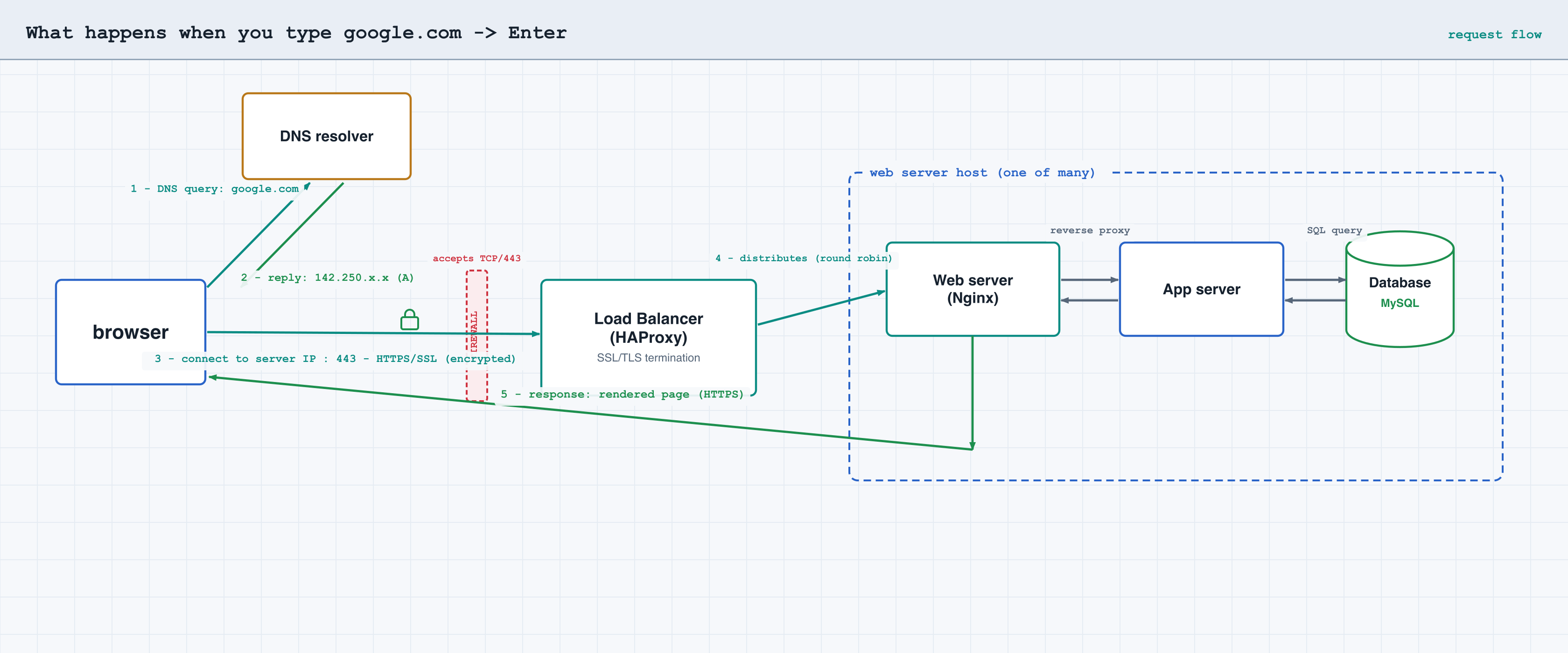
1DNS request — turning the name into an address
The browser needs the address behind www.google.com. It checks its caches (browser, OS,
/etc/hosts); on a miss it asks a DNS resolver, which walks the DNS
hierarchy (root → .com TLD → Google's authoritative name servers). DNS resolves
www.google.com to another hostname (via a CNAME record) or
to an IP address (via an A/AAAA record). The answer is cached for the
record's TTL.
2TCP/IP — opening a connection
With the IP in hand, the browser opens a TCP connection to the server IP on
port 443 (HTTPS). TCP's three-way handshake (SYN → SYN-ACK → ACK) sets up a
reliable, ordered byte stream, and the packets are routed across the internet by IP.
3Firewall — only the right traffic gets through
Before reaching the service, the connection passes through a firewall that accepts traffic on TCP port 443 and denies everything else. Any packet on a disallowed port or from a blocked source is dropped here.
4HTTPS/SSL — encrypting the channel
On top of TCP, a TLS handshake runs. The server presents its SSL certificate, signed by a Certificate Authority the browser trusts; this proves the server's identity and is used to negotiate a shared session key. From here, all traffic is encrypted using HTTPS/SSL — giving confidentiality, integrity, and authentication.
5Load balancer — choosing a server
The public IP belongs to a load balancer (e.g. HAProxy), not a single machine. The load balancer distributes the request to one of its web servers, using a distribution algorithm such as round robin, after health-checking its backends.
6Web server — serving the page
The chosen web server (e.g. Nginx) answers the request by serving the web page. It handles HTTP, serves static content directly, and reverse-proxies dynamic requests to the application layer behind it.
7Application server — generating the page
For dynamic content, the application server generates the web page by running the application code (the business logic). The page does not exist until it is built for this request.
8Database — gathering the data
To build the page, the application server queries the database (e.g. MySQL) to gather the necessary data. The rows come back, the application finishes building the page, and the response travels back — encrypted — through the web server, load balancer, and firewall to your browser, which parses the HTML/CSS/JS and paints the page.